Sensitive Configuration
Sensitive configuration, i.e. secrets, can be configured in GitHub and passed to applications as environment variables via the P2P pipeline.
Use this pattern when a service needs a sensitive runtime value, such as an OAuth client secret, token encryption key, signing key, SMTP password, or third-party API credential.
Secrets flow through four layers:
- GitHub repository secret stores the sensitive value.
- GitHub Actions workflow maps the repository secret into the reusable P2P workflow’s
env_varssecret block. - P2P config maps the workflow variable into
envVarsMapfor the deployed workload or config job. - Application config reads the final runtime environment variable.
Keep the runtime environment variable name stable. The GitHub secret name can vary by environment, but the application should read one consistent variable name.
Configure The Secret In GitHub
You will need to be in the admin role for the application’s repository to configure variables and secrets.
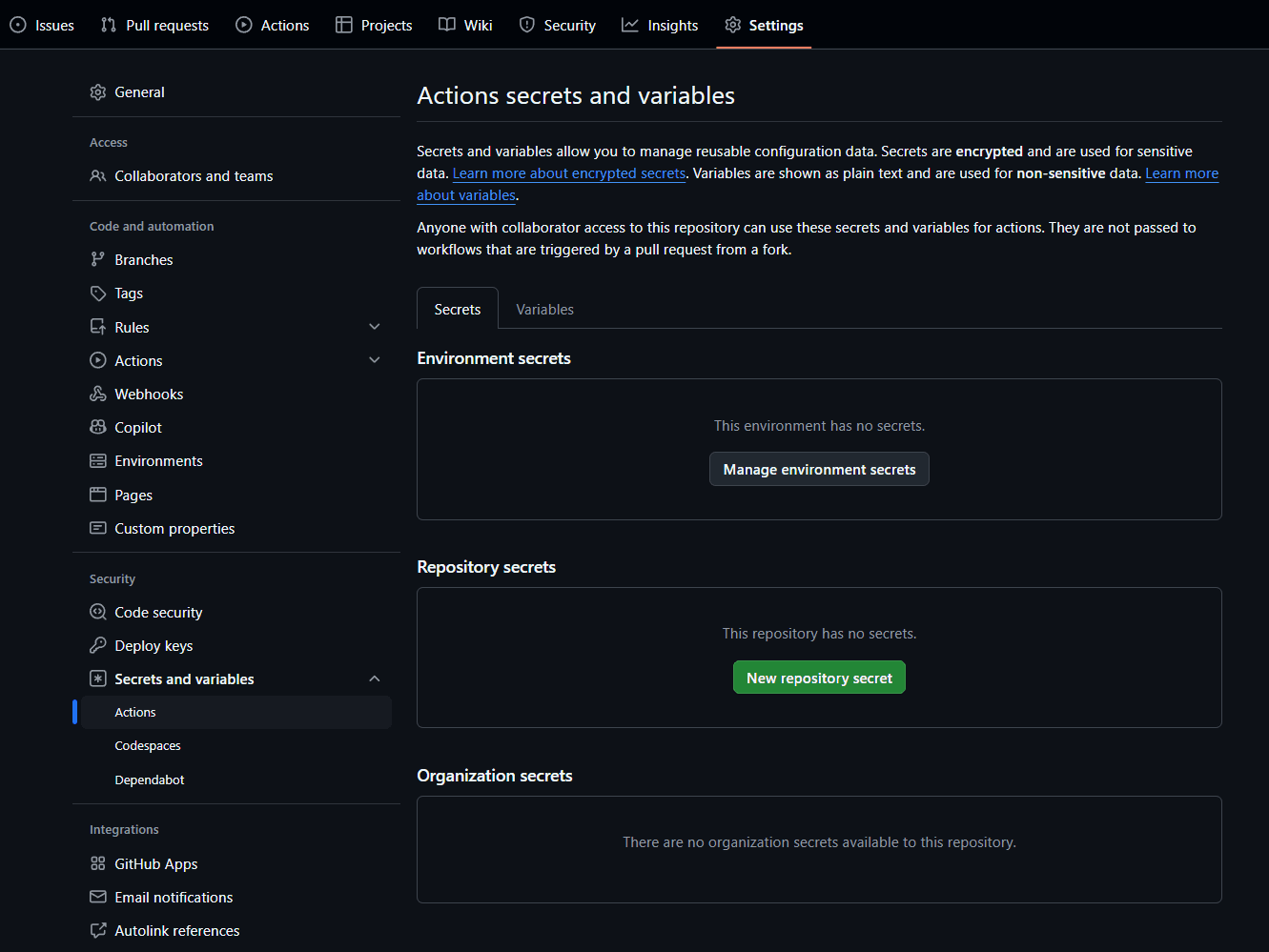
Create the secret as a repository-level GitHub Actions secret:
- Open the GitHub repository.
- Go to Settings > Secrets and variables > Actions.
- Choose New repository secret.
- Enter the secret name and value.
- Save the secret.
Do not commit secret values into p2p/config/*.yaml, application config files, Helm values, generated config, test fixtures, or documentation examples.
Pattern 1: Same Secret Value In Every Environment
Use this when the same credential is valid in all deployed environments.
Example use cases:
- A shared signing private key.
- A token encryption key shared by all deployment stages.
- A third-party credential that is not environment-specific.
Create one GitHub repository secret:
SERVICE_SIGNING_KEY_PRIVATE=<sensitive-value>Map the same repository secret in every workflow that deploys the service:
jobs:
  fastfeedback:
    uses: coreeng/p2p/.github/workflows/p2p-workflow-fastfeedback.yaml@v1
    secrets:
      slack_webhook_url: ${{ secrets.P2P_SLACK_WEBHOOK_URL }}
      env_vars: |
        SIGNING_KEY_PRIVATE=${{ secrets.SERVICE_SIGNING_KEY_PRIVATE }}

  extendedtests:
    uses: coreeng/p2p/.github/workflows/p2p-workflow-extended-test.yaml@v1
    secrets:
      slack_webhook_url: ${{ secrets.P2P_SLACK_WEBHOOK_URL }}
      env_vars: |
        SIGNING_KEY_PRIVATE=${{ secrets.SERVICE_SIGNING_KEY_PRIVATE }}

  prod:
    uses: coreeng/p2p/.github/workflows/p2p-workflow-prod.yaml@v1
    secrets:
      slack_webhook_url: ${{ secrets.P2P_SLACK_WEBHOOK_URL }}
      env_vars: |
        SIGNING_KEY_PRIVATE=${{ secrets.SERVICE_SIGNING_KEY_PRIVATE }}
Then expose the workflow variable to the workload in p2p/config/common.yaml:
envVarsMap:
  SIGNING_KEY_PRIVATE: "${SIGNING_KEY_PRIVATE}"
Finally, read the stable runtime variable from application config:
security:
  signing-key-private: ${SIGNING_KEY_PRIVATE:}
The application reads SIGNING_KEY_PRIVATE in every environment. Only the workflow decides which GitHub secret supplies it.
Pattern 2: Different Secret Value Per Environment
Use this when each environment has its own credential.
Example use cases:
- OAuth client secrets for integration, extended test, and production app registrations.
- SMTP credentials with separate mail providers or accounts per environment.
- Credentials scoped to environment-specific third-party tenants.
Create one GitHub repository secret per environment:
AUTH_PROVIDER_CLIENT_SECRET_INTEGRATION=<integration-secret>
AUTH_PROVIDER_CLIENT_SECRET_EXTENDED=<extended-test-secret>
AUTH_PROVIDER_CLIENT_SECRET_PROD=<production-secret>
Map each environment-specific GitHub secret to the same workflow variable name:
jobs:
  fastfeedback:
    uses: coreeng/p2p/.github/workflows/p2p-workflow-fastfeedback.yaml@v1
    secrets:
      slack_webhook_url: ${{ secrets.P2P_SLACK_WEBHOOK_URL }}
      env_vars: |
        AUTH_PROVIDER_CLIENT_SECRET=${{ secrets.AUTH_PROVIDER_CLIENT_SECRET_INTEGRATION }}

  extendedtests:
    uses: coreeng/p2p/.github/workflows/p2p-workflow-extended-test.yaml@v1
    secrets:
      slack_webhook_url: ${{ secrets.P2P_SLACK_WEBHOOK_URL }}
      env_vars: |
        AUTH_PROVIDER_CLIENT_SECRET=${{ secrets.AUTH_PROVIDER_CLIENT_SECRET_EXTENDED }}

  prod:
    uses: coreeng/p2p/.github/workflows/p2p-workflow-prod.yaml@v1
    secrets:
      slack_webhook_url: ${{ secrets.P2P_SLACK_WEBHOOK_URL }}
      env_vars: |
        AUTH_PROVIDER_CLIENT_SECRET=${{ secrets.AUTH_PROVIDER_CLIENT_SECRET_PROD }}
Expose that stable name in p2p/config/common.yaml:
envVarsMap:
  AUTH_PROVIDER_CLIENT_SECRET: "${AUTH_PROVIDER_CLIENT_SECRET}"
Read the stable runtime variable from the application or config job:
identity-provider:
  client-secret: ${AUTH_PROVIDER_CLIENT_SECRET:}
The GitHub secret names identify where the value comes from. The runtime variable name identifies what the application needs.
Prefer this repository-secret naming pattern for P2P workflows. GitHub Environment secrets should only be used when the workflow job explicitly binds to a GitHub environment.
Config Jobs And Generated Configuration
Some deployments include a config job that applies generated configuration to another system. For example, a config job may read environment variables and substitute them into YAML templates before applying them.
Use the same pattern, but map the workflow variable into the config job’s environment first:
envVarsMap:
  CONFIG_CLI_AUTH_PROVIDER_CLIENT_SECRET: "${AUTH_PROVIDER_CLIENT_SECRET}"
Then reference the config job variable from generated or imported config:
identityProviders:
  - alias: auth-provider
    config:
      clientSecret: "$(env:CONFIG_CLI_AUTH_PROVIDER_CLIENT_SECRET)"
This keeps the externally configured secret, the workflow variable, and the config job variable separate:
- GitHub secret: where the sensitive value is stored.
- Workflow variable: the deployment-time contract passed into P2P.
- Config job variable: the environment variable consumed by the config tooling.
Naming Guidance
Use names that make the boundary clear:
- GitHub secrets should include the owning service or capability, such as
SERVICE_SIGNING_KEY_PRIVATE. - Environment-specific GitHub secrets should end with the environment, such as
_INTEGRATION,_EXTENDED, or_PROD. - Runtime environment variables should be stable across environments, such as
SIGNING_KEY_PRIVATEorAUTH_PROVIDER_CLIENT_SECRET. - Config job variables may use a tool-specific prefix when that makes the consuming boundary clearer, such as
CONFIG_CLI_.
Avoid making application code aware of deployment environment suffixes. Application code should not read *_PROD, *_EXTENDED, or *_INTEGRATION variables directly.
Checklist For Adding A New Secret
- Decide whether the value is shared across environments or different per environment.
- Create the repository secret or secrets in GitHub Actions settings.
- Add each secret to the correct workflow’s
secrets.env_varsblock. - Map the workflow variable into
p2p/config/common.yamlor the relevant environment-specific P2P config usingenvVarsMap. - Read the final runtime variable from application config or config job templates.
- Keep committed config limited to variable references such as
${VARIABLE_NAME}or$(env:VARIABLE_NAME). - Run the relevant deployment workflow and confirm the application starts without logging the secret value.
Validating The Application Has The Expected Variables
After the application is deployed to the relevant environment, configure cluster access and get a running pod:
kubectl get pods -n <namespace>Then check that the expected variable name is present without printing the secret value:
kubectl exec -n <namespace> <pod-name> -- sh -c 'test -n "${AUTH_PROVIDER_CLIENT_SECRET}" && printf "AUTH_PROVIDER_CLIENT_SECRET is set\n"'Do not paste secret values into tickets, chat, logs, pull requests, or documentation.
Troubleshooting
| Symptom | Likely cause | Check |
|---|---|---|
| Runtime variable is empty | GitHub secret was not mapped into env_vars for that workflow | Check the workflow for the target environment |
| Works in production but not test | Environment-specific GitHub secret is missing or mapped to the wrong name | Compare _PROD, _EXTENDED, and _INTEGRATION mappings |
| Application reads the wrong value | Application is reading an environment-specific variable directly | Use one stable runtime variable name in application config |
| Config job applies a blank value | Config job envVarsMap does not expose the variable used by the template | Compare envVarsMap with $(env:...) references |
| Secret value appears in git diff | A real secret was pasted into committed config | Remove it immediately and rotate the secret |