Troubleshooting
CreateContainerError: failed to reserve container name
The container runtime is unable to get the container into a running state so it’s stuck in pending.
A potential cause could be resource starvation on nodes. Check the cpu/memory usage of the node the pod is running on:
kubectl top node $(kubectl get pod <pod-name> -o jsonpath='{.spec.nodeName}')

NAME                                             CPU(cores)   CPU%   MEMORY(bytes)   MEMORY%
gke-sandbox-gcp-sandbox-gcp-pool-18d01f3c-xhd8   174m         9%     2047Mi          33%
If the node cpu/memory usage is high, it’s possible the container runtime is struggling to find enough resources to be able to run the container.
Resolution
Ensure that your pod has cpu/memory requests set. This will allow the kube scheduler to to place your pods on better balanced nodes.
P2P GCP Auth Fail
I’ve got a new app, and when the P2P tries to authenticate with Google Cloud, it fails with an error like this:
Error: google-github-actions/auth failed with: retry function failed after 4 attempts: failed to generate Google Cloud federated token for projects/{{ project-number }}/locations/global/workloadIdentityPools/p2p-knowledge-platform/providers/p2p-knowledge-platform: (400) {"error":"invalid_target","error_description":"The target service indicated by the \"audience\" parameters is invalid. This might either be because the pool or provider is disabled or deleted or because it doesn't exist."}This is likely as the tenant definition has either not been deployed or doesn’t contain the GitHub repo. Without this the GitGub Action does not have permission to authenticate with GCP.
To find the problem with your tenant deployment, you can either:
- use ArgoCD UI by accessing
https://argocd.{{ internalServices.domain }} kubectlCLI (may need a platform admin to run):
Note: all of this is internal implementation details of the platform and may change in the future.
Check tenant deployment status
Does the tenant exist? Is it healthy? Is it synchedd?
With kubectl:
kubectl get -n argocd apps <tenant-name>
NAME                 SYNC STATUS   HEALTH STATUS
<tenant-name>        Synced        Healthy
With the ArgoCD UI:

If tenant is not synched/healthy, what is the reason?
With kubectl:
kubectl -n argocd describe app <tenant-name>Why is it not synched/healthy will be in the output.
With the ArgoCD UI:
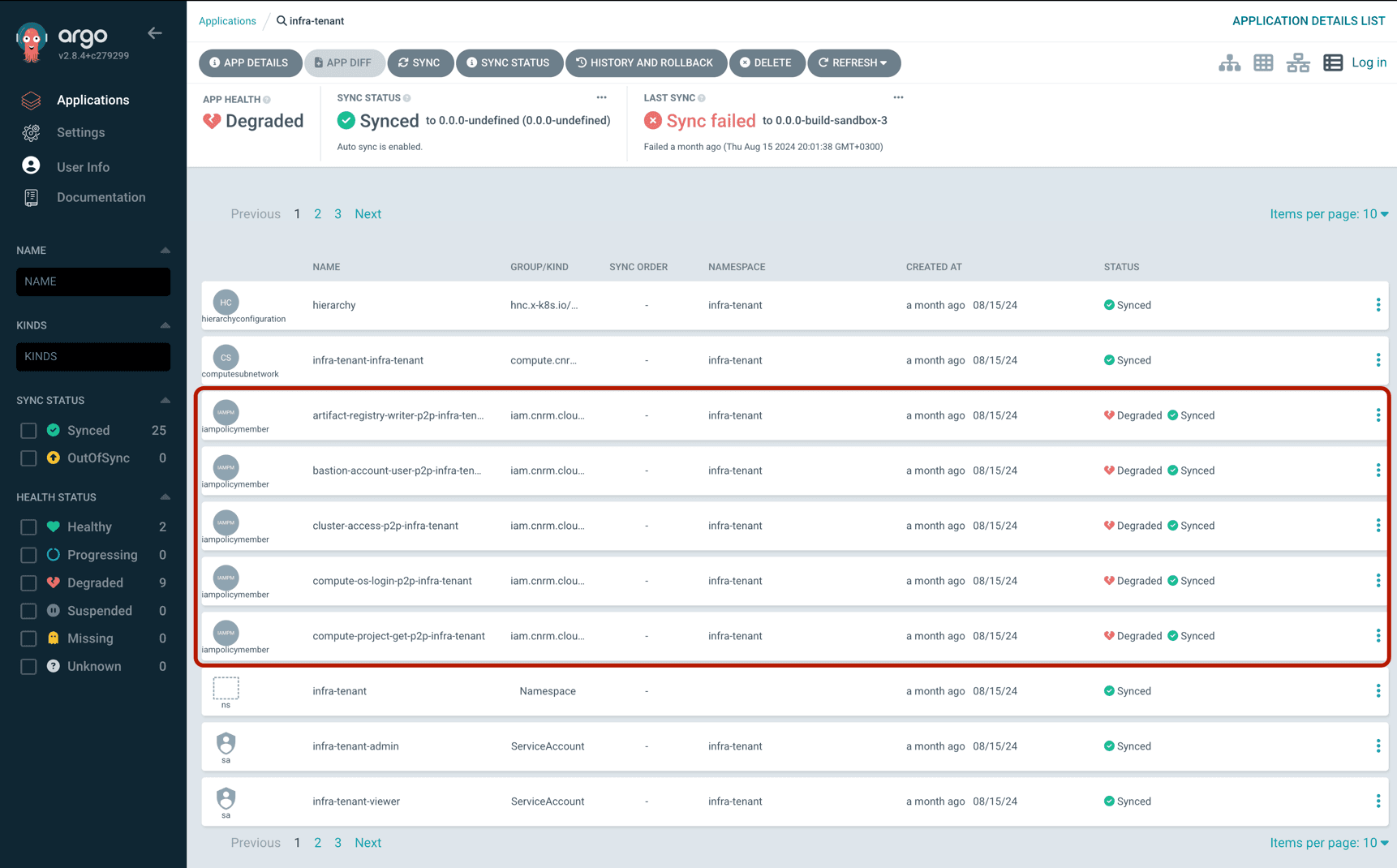
Does the tenant have the right repo?
With kubectl:
kubectl get -n argocd apps <tenant-name> -o yamlIt should contain output which includes:
- name: tenant.repos
  value: '["https://github.com/{{ github-org }}/{{ github-repo }}"]'
With the ArgoCD UI (App Details > Parameters):
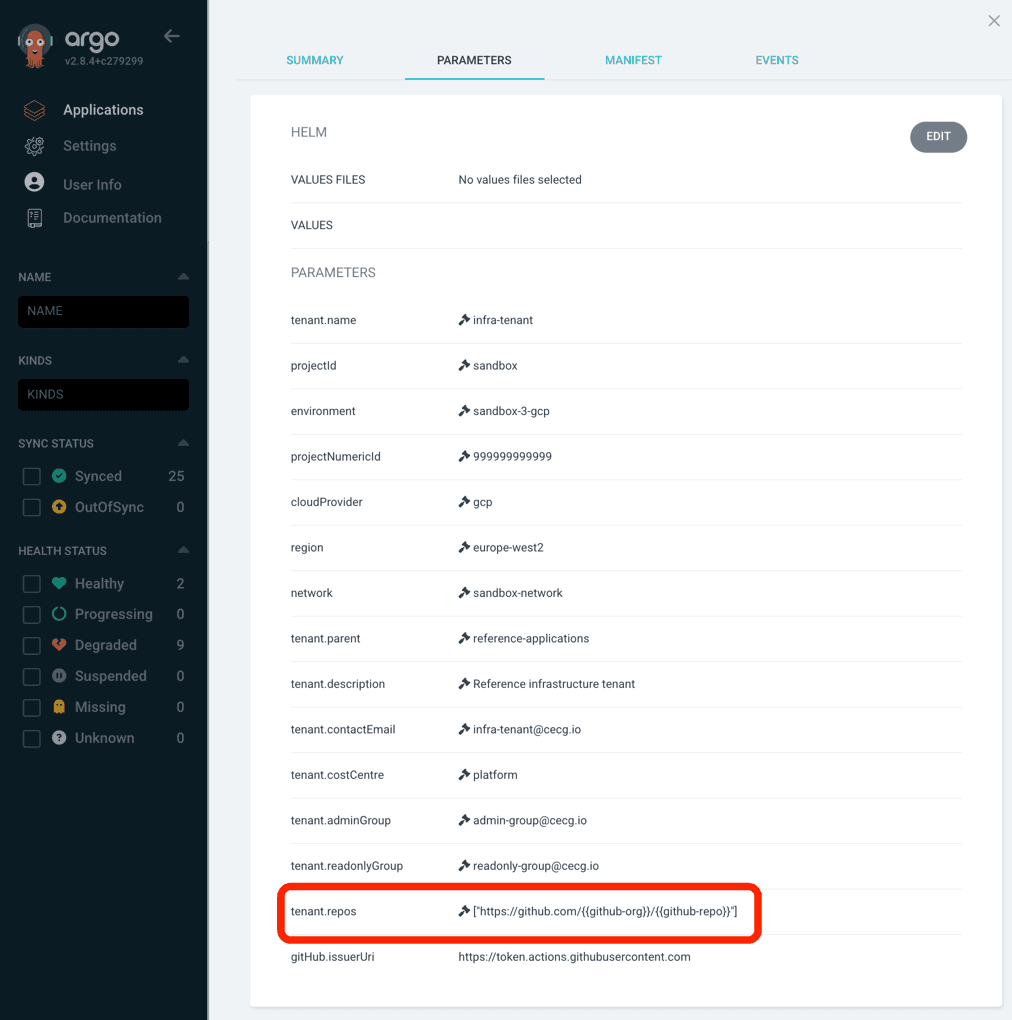
If you’ve added the repo to the tenant, but it isn’t shown here, then likely the new tenant definition hasn’t been deployed to the environment.
P2P Kubeconfig can not setup tunnel
ERROR: (gcloud.compute.start-iap-tunnel) Could not fetch resource:
 - Required 'compute.instances.get' permission for 'projects/{{ project-id }}/zones/europe-west2-a/instances/sandbox-gcp-bastion'
Follow the same steps as defined in P2P GCP Auth Fail to ensure the tenancy is setup correctly.
Then check that the IAMPolicyMember resources are properly syncing with GCP e.g. for a tenant called knowledge-platform
kubectl -n knowledge-platform get iampolicymembers.iam.cnrm.cloud.google.com                                                                                                                                                      │
NAME                                              AGE   READY   STATUS     STATUS AGE                                                                                                                                                                                            │
artifact-registry-writer-p2p-knowledge-platform   68m   True    UpToDate   68m                                                                                                                                                                                                   │
bastion-account-user-p2p-knowledge-platform       68m   True    UpToDate   68m                                                                                                                                                                                                   │
cluster-access-p2p-knowledge-platform             89m   True    UpToDate   89m                                                                                                                                                                                                   │
compute-os-login-p2p-knowledge-platform           68m   True    UpToDate   68m                                                                                                                                                                                                   │
compute-project-get-p2p-knowledge-platform        68m   True    UpToDate   68m                                                                                                                                                                                                   │
compute-viewer-p2p-knowledge-platform             68m   True    UpToDate   68m                                                                                                                                                                                                   │
iap-user-p2p-knowledge-platform                   68m   True    UpToDate   68m                                                                                                                                                                                                   │
workflow-identity-p2p-knowledge-platform          89m   True    UpToDate   89m
For the above error the compute-os-login-p2p-knowledge-platform one is responsible for giving access.
P2P Helm Numeric Value Error
Error
P2P fails on the helm upgrade step, while trying to apply the helm charts
- ie running.
helm upgrade --host=localhost --set port=123), results in error:
ERROR: json: cannot unmarshal number into Go struct field EnvVar.spec.template.spec.containers.env.value of type stringThis is caused by your helm chart which contains values that are to be overridden, as for example if in our helm chart we had the below with:
host: { { .Values.Host } }
port: { { .Values.Port } }
where these are meant to be passed over to kubernetes manifests, we need to guarantee that both of them are treated as string and not as numeric.
So if in the example above where, you where trying to override with --set port=123, this causes parsing issues on the helm and kubernetes side.
Solution
To fix this, we can safely “quote” the variables in question as per below:
host: { { .Values.Host } }
port: { { .Values.Port | quote } }
Blocked native application creation
This section applies to the saved progress page opened by native application creation, not the legacy cloud configuration flows above.
Read the current stage’s blocked reason and follow any verified repository or workflow links. When automatic retries are scheduled, the page shows the next action time; let that active operation continue rather than attempting competing manual recovery. If you are not an administrator in the selected Context, share the progress link with a Context administrator. Only administrators can submit recovery.
Repair prerequisites first
- GitHub authentication: ask the user who initiated creation to repair their current GitHub connection. Creation continues to use that user’s credentials; an administrator cannot switch it to their own connection by retrying.
- Configuration: repair missing or invalid prerequisites before retrying. Recovery does not replace the saved creation configuration or bypass its validation.
- Repository identity or placement conflicts: investigate and repair the conflict. Recovery does not adopt or replace another repository, overwrite user commits, or bypass ownership checks.
Choose the stage-specific action
An eligible blocked stage offers an administrator a recovery dialog beside that stage. Review its effect and supply a nonblank reason (at most 2,000 UTF-8 bytes) for the audit record. Do not include secrets. Recovery retains successful predecessors and continues the same operation, not the entire wizard again.
- Template preparation, repository creation/setup, saving, and repository configuration resume from their saved checkpoints, subject to the same safety checks.
- Check provisioning again resets the wait budget and checks the same cluster generations and desired revision. It does not recreate infrastructure or directly command a cluster to reconcile.
- Check run again resumes observation of the recorded workflow run after a read, authentication, or timeout failure; it does not dispatch a fresh run.
- A known failed Fast Feedback, Extended Test, Production, or Security Scan workflow can offer a fresh workflow retry. It uses the original generated commit, not a later commit containing your fixes. Review the displayed commit before confirming. Retry Production deployment explicitly requires confirmation that it starts another production deployment of that original commit.
Later stages remain pending until the recovered stage succeeds. Historical paused operations cannot be resumed by these controls.
Unknown repository or workflow outcomes
Resolve repository outcome and Resolve unknown run or checkpoint outcome are diagnostic guidance, not commands that attach identities. A previous write may already have created a repository or started a workflow, even when its response was lost. Investigate before creating another resource or starting another run. There is no automatic identity attachment or safe recovery button when the recorded outcome cannot establish a safe action; an older recorded run does not resolve an unknown fresh retry.
Verify progress before another attempt
After a recovery submission, the dashboard refreshes the same operation and resumes polling if it is active. Saved progress remains visible while the request or refresh is pending.
If the operation changed, or the submission outcome/current progress cannot be verified, use Refresh progress and review the current stage before making another explicit recovery attempt. A refresh is read-only; it does not replay the recovery request. Do not repeat a mutation blindly after a lost response. If your Context changes, return to the operation in its original Context before continuing.